
 Sora 3 Pro
Social shorts and vertical stories
Generate 9:16 clips with ambience and sound effects built in, ready to post.
Write a prompt, animate a first and last frame, or mix image, video and audio references. Sora 3 renders 4–15 s clips (up to 30 s on Sora 3 Pro) from 480p to 4K, with optional sound in the same pass.
4–30 s · 480p to 4K · 21:9 to 9:16Fashion films, portraits, product shots and short stories made with Sora 3 Pro. Open any clip to read its prompt and remix it.
Sora 3 is the AI video model behind this studio. Start from words, from one or two still frames, or from a set of reference images, clips and audio, and get a finished MP4 with optional sound.
Describe the subject, action, camera move, light and sound in up to 2,500 characters (30,000 on Sora 3 Pro). Turn on web search to ground prompts about real places or products, then pick any ratio from 21:9 to 9:16.

Upload one image as the first or last frame, or set both to fix where the shot starts and ends. Sora 3 fills in the motion between them, which suits product reveals, before-and-after shots and planned transitions.

Combine reference images, video clips and audio clips to keep a face, a motion style and a voice consistent from shot to shot. Sora 3 takes up to 9 images, 3 videos and 3 audio clips; Sora 3 Pro raises that to 30, 10 and 10.

Every example here was generated with Sora 3 or Sora 3 Pro. Copy the prompt, change the subject or setting, and add one line for sound or dialogue: audio is generated together with the video.
Visual example
Reference prompt
Sora 3 Pro · Text to Video
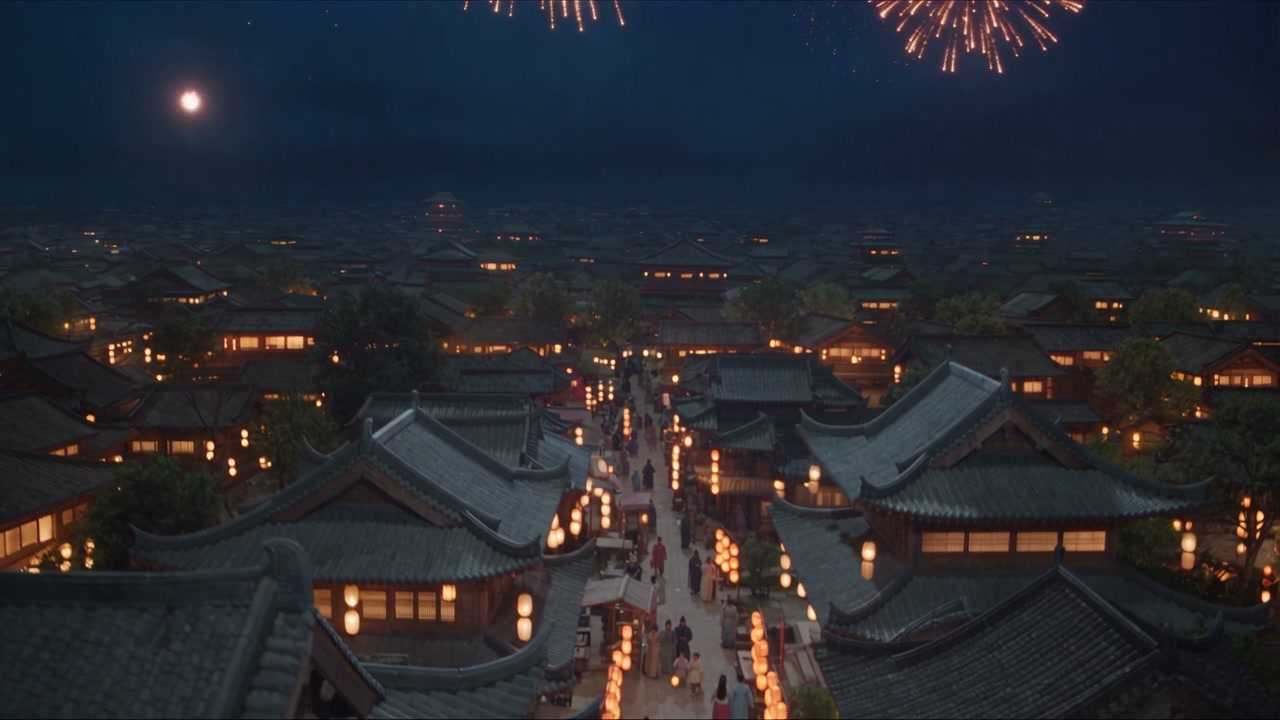
An ancient Chinese city during a lantern festival at night. Fireworks bloom above tiled roofs, warm lanterns line the streets. The aerial camera descends slowly past the rooftops toward a lively market. Deep blue sky, warm practical light, an expansive cinematic atmosphere.
From vertical social clips to 4K product films, these are the projects people create with Sora 3 most often.
Sora 3 ProGenerate 9:16 clips with ambience and sound effects built in, ready to post.
 Sora 3 Pro
Set the first and last frame to control the reveal, then export up to 4K.
 Sora 3 Pro
Reference video and audio clips carry motion and rhythm across cuts.
 Sora 3 Pro
Reference images keep characters on model; the last frame starts your next shot.
Both models share the same three modes, resolutions and aspect ratios. Sora 3 Pro adds longer clips, longer prompts, more reference slots and MOV export.
| Spec | Sora 3 | Sora 3 Pro |
|---|---|---|
| Generation modes | Text, image (first/last frame), multimodal reference | Text, image (first/last frame), multimodal reference |
| Duration | 4–15 s | 4–30 s or automatic |
| Resolution | 480p, 720p, 1080p, 4K | 480p, 720p, 1080p, 4K |
| Aspect ratios | 21:9, 16:9, 4:3, 1:1, 3:4, 9:16, adaptive | 21:9, 16:9, 4:3, 1:1, 3:4, 9:16, adaptive |
| Reference images | Up to 9 | Up to 30 |
| Reference video clips | Up to 3 | Up to 10 (2–30 s each, 30 s total) |
| Reference audio clips | Up to 3 | Up to 10 (2–30 s each, 30 s total) |
| Prompt length | Up to 2,500 characters | Up to 30,000 characters |
| Generated audio | Optional: effects, ambience, dialogue | Optional: effects, ambience, dialogue |
| Output format | MP4 | MP4 or MOV |
Plans & Credit Packs
Sora 3 runs on credits. New accounts get 6 free credits to try Sora 3 Mini; monthly, yearly and one-time credit packs are coming soon.
Checkout isn't open yet. Plans and credit packs are coming soon.
Quick answers about Sora 3 modes, specs, credits and getting better results.
Sora 3 is an AI video generation model that turns text prompts, still images and reference images, video and audio into short videos with optional sound. On this site you run it in the browser and download the result as an MP4.
Pick a mode (text to video, image to video or reference), write your prompt, choose duration, resolution and aspect ratio, and check the credit cost. Click Generate, preview the clip when it is ready, and download the MP4.
Yes. New accounts get 6 free credits, enough for one 5-second 720p Sora 3 Mini video. Paid plans and credit packs are coming soon.
Both share the same modes, 480p to 4K output and aspect ratios. Sora 3 Pro supports clips up to 30 seconds (Sora 3: 4–15 s), prompts up to 30,000 characters, up to 30 reference images plus 10 video and 10 audio clips, and MOV export in addition to MP4.
Yes. Upload one image as the first or last frame, or two images to set both ends of the shot, then describe the motion. Sora 3 animates the scene in between.
In reference mode you attach media the result should stay consistent with: images for characters, products or style, video clips for motion, and audio clips for voice or rhythm. Sora 3 accepts up to 9 images, 3 videos and 3 audio clips; Sora 3 Pro accepts 30, 10 and 10, with each reference clip 2–30 seconds long.
Yes, if you want it to. Turn on audio and Sora 3 creates sound effects, ambience and dialogue in the same pass as the video. Describe the sound in your prompt, for example footsteps on gravel or a short line of dialogue.
Sora 3 outputs 480p, 720p, 1080p or 4K in 21:9, 16:9, 4:3, 1:1, 3:4 or 9:16, or an adaptive ratio that follows your input. Clips run 4–15 seconds on Sora 3 and 4–30 seconds, or automatic length, on Sora 3 Pro.
Up to 2,500 characters on Sora 3 and up to 30,000 on Sora 3 Pro. You can also turn on web search so Sora 3 can look up context for real places or products mentioned in your prompt.
Turn on Return Last Frame. Sora 3 gives you the final frame of the clip, which you can use as the first frame of your next generation. Reference images keep characters consistent across the clips.

Type a prompt or upload a frame, add sound if you like, and download your Sora 3 clip as an MP4. New accounts start with free credits.
Create with Sora 3